- Published on
vite-tsconfig-paths: 'Cannot find package' in Nx + Vitest
- Author

- Name
- Karuppusamy D
- Headline
- Senior Software Engineer
The symptom: "Cannot find package" in CI
You run your Vitest tests locally in an Nx monorepo and everything passes. You push to CI, and the same suite fails:
Error: Cannot find package '@acme/shared' imported from
  '/home/runner/work/acme/libs/acme/auth/src/index.ts'
The full output looks like this:
> nx run acme-auth:test

 FAIL  libs/acme/auth/src/index.test.ts
Error: Cannot find package '@acme/shared' imported from
  '/home/runner/work/acme/libs/acme/auth/src/index.ts'

 ❯ libs/acme/auth/src/index.ts:2:1
      1| import { z } from "zod";
      2| import { sharedSchema } from "@acme/shared";
       | ^
Cannot find package comes from Node's ESM resolver rather than from Vite. Node received @acme/shared as a bare package specifier, looked for it in node_modules, and found nothing. So whatever was supposed to rewrite that specifier into a file path never ran.
I diagnosed this against vite-tsconfig-paths@6.1.0 with Vite 7 and Vitest 4.
The Nx monorepo layout that triggers it
This is the layout Nx generates for a nested library:
.
├── pnpm-workspace.yaml
├── tsconfig.base.json      # path mappings live here
├── tsconfig.json           # solution config: files: [], references only
├── libs/
│   ├── acme/
│   │   ├── shared/         # shared library
│   │   │   ├── tsconfig.json
│   │   │   ├── tsconfig.lib.json
│   │   │   └── src/index.ts
│   │   └── auth/           # library under test
│   │       ├── tsconfig.json
│   │       ├── tsconfig.lib.json
│   │       ├── tsconfig.spec.json
│   │       ├── vitest.config.mts
│   │       └── src/index.ts (imports @acme/shared)
The path mappings live in tsconfig.base.json:
{
  "compilerOptions": {
    "baseUrl": ".",
    "paths": {
      "@acme/shared": ["libs/acme/shared/src/index.ts"],
      "@acme/auth": ["libs/acme/auth/src/index.ts"]
    }
  }
}
The library's own tsconfig.json contains no files and no paths. It is a solution config, and its only job is to point at the two configs that do the real work:
{
  "extends": "../../../tsconfig.base.json",
  "files": [],
  "include": [],
  "references": [
    { "path": "./tsconfig.lib.json" },
    { "path": "./tsconfig.spec.json" }
  ]
}{
"extends": "../../../tsconfig.base.json",
"compilerOptions": { "rootDir": "src", "outDir": "dist" },
"include": ["src/**/*.ts"],
"references": [{ "path": "../shared/tsconfig.lib.json" }]
}The root tsconfig.json follows the same pattern: "files": [] plus a references entry for every project in the workspace.
The whole problem comes out of that shape. The config the plugin can find by name is the one with nothing useful in it, and the configs that carry the mappings are reachable only through references.
Why vite-tsconfig-paths never applies the path mapping
The import falls through two separate gaps.
Gap 1: pnpm never linked the nested library into node_modules
In a pnpm workspace, sibling libraries are normally linked into node_modules by their package name, so @acme/shared resolves through plain Node resolution whether or not any Vite plugin is involved. That only happens if the library is matched by a glob in pnpm-workspace.yaml:
packages:
  - "apps/*"
  - "libs/*"
libs/* matches libs/shared, but it does not match libs/acme/shared, because the glob covers a single path segment. Nested libraries fall outside the workspace and never get linked into node_modules. A clean install on the failing commit confirmed it: there was no node_modules/@acme directory at all.
Nothing warns you about this. pnpm install succeeds, and TypeScript stays happy, because TypeScript resolves @acme/shared through paths rather than through node_modules.
That leaves the path mapping as the only way the import can resolve.
Gap 2: the reference expansion is dropped by the dedup guard
vite-tsconfig-paths crawls the workspace for files named tsconfig.json or jsconfig.json, parses each one, and registers a resolver for it. Later, for each import, it walks up from the importing file's directory and tries the resolvers registered along the way.
The library's tsconfig.json produces no resolver, because the plugin skips any config that matches no files:
// vite-tsconfig-paths, createResolver()
if (config.files?.length == 0 && !config.include?.length) {
  debug(
    `[!] Skipping "${configPath}" as no files can be matched since ` +
      `"files" is empty and "include" is missing or empty.`
  );
  return null;
}
That is the correct call. An empty solution config has no files to apply mappings to. The useful resolvers are supposed to come from its references, tsconfig.lib.json and tsconfig.spec.json, which inherit paths from the base config and do match real files. The plugin expands those when it registers the parent.
In the failing run, that expansion never happens. I traced every project the plugin registered, and this is all that landed in the library's directory:
PUSH libs/acme/auth/tsconfig.json [no-resolver] refs: noneOne config, no resolver, and no sign of tsconfig.lib.json. Tracing the registration guard shows why:
PUSH       libs/acme/auth/tsconfig.json  [no-resolver]  refs: none
DEDUP-HIT  libs/acme/auth/tsconfig.json                 refs: 2
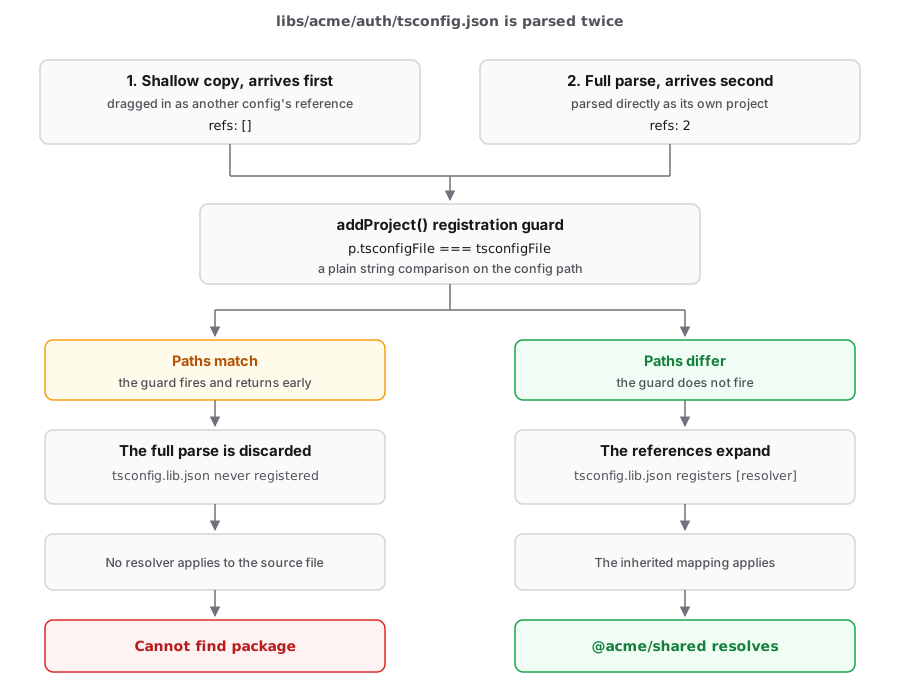
The library's tsconfig.json gets registered twice, and the two arrivals are not the same object. The first one is a shallow parse with its reference list unpopulated, because the parser fills that list only for a config it was asked to parse directly, not for one it pulled in as somebody else's reference. Any config in the workspace whose references include the library drags in a shallow copy of its tsconfig.json on the way through, and in an Nx workspace there is usually more than one. Here the root solution config does it, and so does the app's own tsconfig.json. I confirmed that by emptying the root config's references and running again: the shallow copy still arrived, credited to the app config instead. Removing one parent just hands the job to the next.
That shallow copy arrives first. It registers with no resolver, and since its reference list is empty, it expands nothing.
The full parse arrives second, carrying its 2 references, and runs into this:
// vite-tsconfig-paths, addProject()
if (data?.projects.some((p) => p.tsconfigFile === tsconfigFile)) {
  return;
}
The comparison is a plain string match on the config path. Both arrivals describe the same file, so the paths match, and the function returns before reaching the line that expands the references. The richer object is discarded in favour of the empty one that got there first.
So tsconfig.lib.json is never registered, no resolver ever applies to the source file, and the specifier goes to Node untouched. That is the Cannot find package error.
Why Vitest passes locally but fails in CI
The outcome hinges entirely on that one string comparison, which makes this a bad thing to depend on.
I tested it directly by patching the plugin so the comparison always evaluates false, which is what would happen if the two paths were spelled differently. The reference expansion then ran, tsconfig.lib.json registered with a working resolver, and the import resolved. Same machine, same commit, same everything else.
So on any machine where those two path spellings differ, for any reason, the suite passes. What I could not work out is what would make them differ on Windows specifically. Reading the code, both the plugin and its parser normalize separators, and the plugin also forces the drive letter to upper case, so neither backslashes nor drive letter casing explains a mismatch. That is a reading, not a measurement, since I have no Windows machine to test on. Crawl ordering I did rule out by measurement: forcing sorted and reverse sorted order changed nothing.
If you want to check this on your own machine, add one line above that guard in node_modules/vite-tsconfig-paths/dist/index.js:
console.error(
  "CMP",
  JSON.stringify(tsconfigFile),
  JSON.stringify(data?.projects.map((p) => p.tsconfigFile))
);
If the spellings differ, that is your answer.
There is a duller possibility worth ruling out first. If node_modules still holds a link to the library from an earlier install, the import resolves through Node and the plugin never matters at all. I confirmed that separately: with the link present, the suite passes with the plugin removed entirely. CI installs into an empty node_modules every run and has no such leftovers, so try rm -rf node_modules && pnpm install --frozen-lockfile before blaming the operating system.
The fix: pass explicit root and projects to tsconfigPaths()
Instead of letting the plugin discover projects, tell it which ones to load:
import { workspaceRoot } from "@nx/devkit";
import tsconfigPaths from "vite-tsconfig-paths";
import { defineConfig } from "vitest/config";

export default defineConfig(() => ({
  root: __dirname,
  plugins: [
    tsconfigPaths({
      root: workspaceRoot,
      projects: ["libs/acme/auth", "libs/acme/shared"],
    }),
  ],
  test: {
    // ... your test config
  },
}));
Why explicit projects works
Setting projects disables the crawl, so none of those parent configs is parsed at all, and nothing gets the chance to pre-register a shallow copy. Each entry in the list is parsed directly, which is exactly the case where the parser populates the reference list. Nothing is already registered under that path, the guard does not fire, and the expansion runs.
The same trace on the fixed config shows what changed:
PUSH  libs/acme/auth/tsconfig.lib.json    [resolver]     refs: none
PUSH  libs/acme/auth/tsconfig.spec.json   [resolver]     refs: none
PUSH  libs/acme/auth/tsconfig.json        [no-resolver]  refs: 2
PUSH  libs/acme/shared/tsconfig.lib.json  [resolver]     refs: none
The solution config still produces no resolver, and it still should not. The difference is that its two references are now registered, they carry the inherited paths, and they match the file doing the importing.
Each entry is resolved against root, and when an entry has no .json extension the plugin appends tsconfig.json itself.
| Option | Purpose |
|---|---|
root | Base for resolving projects entries. Point it at the monorepo root |
projects | Explicit list of directories (or .json files) to load, skipping discovery |
Use relative, forward-slash paths in projects. They are resolved against root on every platform, so there is no reason to build them with path.join.
If you are migrating off nxViteTsPaths
nxViteTsPaths() from @nx/vite/plugins/nx-tsconfig-paths.plugin is deprecated and will be removed in Nx v24, and the Nx Vite guide points you at vite-tsconfig-paths instead. The swap it shows looks like a rename:
- import { nxViteTsPaths } from "@nx/vite/plugins/nx-tsconfig-paths.plugin";
+ import tsconfigPaths from "vite-tsconfig-paths";

  export default defineConfig(() => ({
-   plugins: [nxViteTsPaths()],
+   plugins: [tsconfigPaths()],
  }));
If your libraries are nested, it is not a rename. nxViteTsPaths() resolves against tsconfig.base.json at the workspace root, because it already knows it is running inside an Nx workspace, so it never depends on the reference expansion. tsconfigPaths() makes no such assumption. It crawls, finds the empty solution config, and needs that expansion to survive. The Nx guide says the inferred @nx/vite/plugin ensures every project extends the workspace base tsconfig, which is true and still not enough here, because the config the crawl finds by name matches no files either way.
So use the explicit form rather than the bare call:
tsconfigPaths({
  root: workspaceRoot,
  projects: ["libs/acme/auth", "libs/acme/shared"],
});
I did not hit this myself, since these configs used tsconfigPaths() from the start. But the bare call is what the guide shows, and it is the shape that lands you behind the guard.
What to include in projects
List the library under test plus every workspace library it imports, directly or transitively.
You can find them in the references array, as long as you look in the right file. The library's tsconfig.json only references its own tsconfig.lib.json and tsconfig.spec.json, so it tells you nothing. The sibling-library references live one level down:
{
  "references": [{ "path": "../shared/tsconfig.lib.json" }]
}
Each project referenced there belongs in your projects array. Listing an extra library is harmless, because it only parses one more config, so include too many rather than hunting for a transitive dependency you missed.
Debugging vite-tsconfig-paths resolution
Run the suite with DEBUG=vite-tsconfig-paths to watch this happen:
DEBUG=vite-tsconfig-paths pnpm nx test acme-authThe plugin logs the projects it parsed and prints a [!] Skipping ... line for every config it discarded.
For a trace written to disk instead, set logFile:
tsconfigPaths({
  root: workspaceRoot,
  projects: ["libs/acme/auth", "libs/acme/shared"],
  logFile: "vite-tsconfig-paths.log",
});
That one is easier to read under Nx, where task output is buffered and interleaved across projects.
The better long-term fix: make nested libraries real workspace packages
Explicit projects works, but it leaves you depending on a plugin that drops half its input when two parses of the same file race each other. The first gap is the one worth closing, and it takes two steps rather than one.
First, widen the globs so pnpm sees the nested directories:
packages:
  - "apps/*"
  - "libs/*"
  - "libs/acme/*"
Second, declare the dependency, which is the step that is easy to miss. linkWorkspacePackages defaults to false, so matching a glob only makes a directory part of the workspace. It does not link anything on its own. The consumer has to ask for the package, and with that default you want the workspace: protocol:
{
  "name": "@acme/auth",
  "dependencies": {
    "@acme/shared": "workspace:*"
  }
}
Skip that step and you widen the globs, re-run pnpm install, and nothing changes, which reads exactly like the glob fix not working.
With both in place, pnpm links @acme/shared into node_modules, and it resolves through ordinary Node resolution in Vitest, in the app build, and in the editor. That made the plugin redundant for one of my two libraries. After adding the globs and migrating those libraries to TypeScript project references, with proper exports in each package.json, I removed tsconfigPaths() from that config and the suite still passed.
If you are somewhere in the middle of that migration, keep both: the workspace globs for real resolution, and explicit projects for whatever still depends on path mappings.
If you are setting up tests elsewhere in the same monorepo, I wrote up the groundwork for API tests in implementing API testing for tRPC APIs with Jest.