- Published on
Reverse Engineering Symmetric Cipher Algorithm
- Author

- Name
- Karuppusamy D
- Headline
- Senior Software Engineer
Introduction
The app in this post is a practice target I built for this write-up; no third-party software was modified.
In this post, I am going to show how to reverse engineer a symmetric cipher algorithm whose cryptographic key and encode/decode function is known.
This article is a continuation of the Reverse Engineering Android App article.
⚠️ Disclaimer: This article is just for educational purpose.
Target code
I am going to use the following decode function that uses a symmetric cipher algorithm from the previous post. Here we need to find the encode function.
function Decode(str, strCode = "ABCDEFGHIJKLMNOPQRSTUVWXYZ0123456789") {
  let result = str;
  if (str.length > 0 && str.length <= 14) {
    /* ---- newString (Decryption String) Generation ---- */
    let currentPos = strCode.indexOf(str[0]);
    let newString =
      strCode.substring(currentPos + 1) + strCode.substring(0, currentPos + 1);
    /* ---- End newString Generation ---- */

    result = "";
    for (let i = 1; i < str.length; i++) {
      // Loop through str [1 - length]

      let tmpChar = str[i];
      let pos = newString.indexOf(tmpChar) - i - 1;

      // if pos is negative
      if (pos <= -1) {
        pos += strCode.length;
      }

      // if tmpChar present inside newString (Always true)
      if (newString.indexOf(tmpChar) > -1) {
        result = result + strCode[pos];
      } else {
        result = result + tmpChar;
      }
    }
  }

  // result.length = str.length - 1
  return result;
}
Create a testing environment
First, we need to set up a testing environment to run the code. For that, I am going to create a Javascript file and hook it to an HTML file.
On this script, run the Encode function and pass the result to the Decode function. Then compare the output of the Decode function with the original value and display the status like below.
const encodedValue = Encode(primaryKey);
const decodedValue = Decode(encodedValue);
if (primaryKey == decodedValue) console.log("Success: ", encodedValue);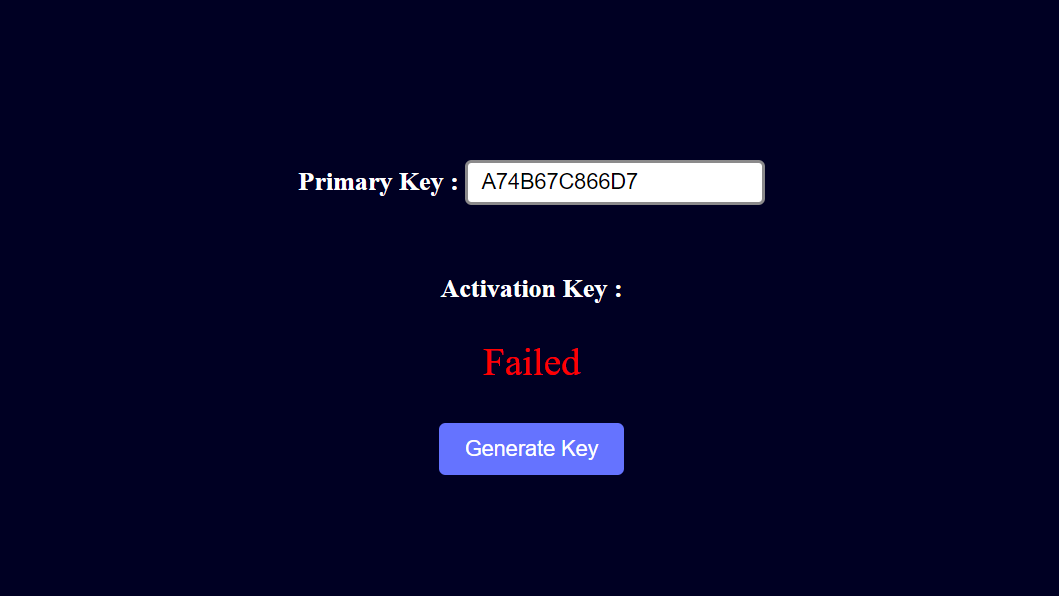
Here is the code of the Testing Environment I have created.
<!doctype html>
<html lang="en">
  <head>
    <meta charset="UTF-8" />
    <meta http-equiv="X-UA-Compatible" content="IE=edge" />
    <meta name="viewport" content="width=device-width, initial-scale=1.0" />
    <title>Key Generator</title>
  </head>
  <body>
    <div class="container">
      <label for="primaryKey">
        <h4>
          Primary Key :
          <input id="primaryKey" value="A74B67C866D7" type="Primary key" />
        </h4>
      </label>
      <h4>
        Activation Key :
        <span id="activation"></span>
      </h4>
      <div id="result"></div>
      <button id="generateBtn">Generate Key</button>
    </div>

    <style>
      body {
        background-color: #000023;
        color: #fff;
        height: 95vh;
      }
      @media (min-width: 800px) {
        .container {
          zoom: 1.3;
          -moz-transform: scale(1.3);
          -moz-transform-origin: 0 0;
        }
      }
      .container,
      body {
        display: flex;
        flex-direction: column;
        justify-content: center;
        align-items: center;
      }
      input {
        padding: 0.25rem 0.5rem;
        background-color: #fff;
        border: 2px solid #8b8a8b;
        border-radius: 4px;
      }
      input:focus {
        outline: 0;
        border: 2px solid #1e00ff7a;
      }
      #result {
        font-size: 1.5rem;
        text-align: center;
      }
      #generateBtn {
        margin-top: 1.5rem;
        padding: 0.5rem 1rem;
        color: #fff;
        background: #6573ff;
        border: none;
        border-radius: 4px;
      }
      #generateBtn:focus {
        outline: 0;
        box-shadow: 0 0 0 2px #1e00ff7a;
      }
    </style>
    <script src="./index.js"></script>
  </body>
</html>const primaryKeyInput = document.getElementById("primaryKey");
const generateBtn = document.getElementById("generateBtn");
generateBtn.addEventListener("click", generateKey);
// Function to Generate Activation Code
function generateKey() {
const primaryKey = primaryKeyInput.value.trim();
if (!primaryKey) {
alert("Please Enter Primary Key!");
return;
}
// Find Activation Code
const firstTimeEncode = Encode(primaryKey);
const secondTimeEncode = Encode(firstTimeEncode);
// Checking if the Activation Code is correct
const res = checkKey(secondTimeEncode);
if (res == primaryKey) {
document.getElementById("activation").innerText = secondTimeEncode;
console.log("Success: ", secondTimeEncode);
}
document.getElementById("result").style.color =
res == primaryKey ? "#29ff29" : "red";
document.getElementById("result").innerText =
res == primaryKey ? "Success!" : "Failed";
// Log Results
console.log({
encoded: secondTimeEncode,
decoded: res,
primaryKey,
res: primaryKey == res,
});
}
// Function to Check Key by decoding generated Activation Code
function checkKey(key) {
// Find Primary key by decoding two times
const firstTimeDecode = Decode(key);
const secondTimeDecode = Decode(firstTimeDecode);
return secondTimeDecode;
}
/* ---------------- Decode Function ---------------- */
function Decode(str, strCode = "ABCDEFGHIJKLMNOPQRSTUVWXYZ0123456789") {
let result = str;
if (str.length > 0 && str.length <= 14) {
/* ---- newString (Decryption String) Generation ---- */
let currentPos = strCode.indexOf(str[0]);
// Shift string before currentPos+1 to last like "BCDEFGHIJKLMNOPQRSTUVWXYZ0123456789.A" for currentPos = 0
let newString =
strCode.substring(currentPos + 1) + strCode.substring(0, currentPos + 1);
/* ---- End newString Generation ---- */
result = "";
for (let i = 1; i < str.length; i++) {
// Loop through str [1 - length]
let tmpChar = str[i];
let pos = newString.indexOf(tmpChar) - i - 1;
// if pos is negative
if (pos <= -1) {
pos += strCode.length;
}
// if tmpChar present inside newString (Always true for our purpose)
if (newString.indexOf(tmpChar) > -1) {
result = result + strCode[pos];
} else {
result = result + tmpChar;
}
}
}
// result.length = str.length - 1
return result;
}
/* ---------------- Encode Function ---------------- */
function Encode(str, strCode = "ABCDEFGHIJKLMNOPQRSTUVWXYZ0123456789") {
/* ---- newString (Encryption String) Generation ---- */
let currentPos = strCode.indexOf(str[0]);
let newString =
strCode.substring(currentPos + 1) + strCode.substring(0, currentPos + 1);
/* ---- End newString Generation ---- */
let result = "";
// Loop through str
for (let i = 1; i < str.length; i++) {
let char = str[i];
let pos = newString.indexOf(char) - i - 1;
// If pos is negative
if (pos <= -1) {
pos += strCode.length;
}
result = result + strCode[pos];
}
return result;
}
generateBtn.click();Understanding the code and reverse it:
👍 Tip: Use Chrome debugger to analyze the code.
Here in the Decode function, the first value of str is used only for newString generation and stripped from actual decoding. So the Encrypt function should return str.length + 1 chars.
So we need to change let result = '' to let result = str[0], and for loop should start from position 0 instead of 1.
Inside the for loop, the position of the char taken from the newString. Then the result is reduced by (i + 1) and saved as pos. If the pos value is negative then it is incremented by strCode.length. Finally, strCode[pos] is returned.
To reverse it, we need to change
let pos = newString.indexOf(char) - i - 1;
if (pos <= -1) {
  pos += strCode.length;
}
result = result + strCode[pos];
to
let pos = strCode.indexOf(char) + i + 2;
if (pos >= newString.length) {
  pos -= newString.length;
}
result = result + newString[pos];
Final code
Here's the reversed encode function for the above decrypt function.
function Encode(str, strCode = "ABCDEFGHIJKLMNOPQRSTUVWXYZ0123456789") {
  /* ---- newString (Encryption String) Generation ---- */
  let currentPos = strCode.indexOf(str[0]);
  let newString =
    strCode.substring(currentPos + 1) + strCode.substring(0, currentPos + 1);
  /* ---- End newString Generation ---- */
  let result = str[0];

  // Loop through str
  for (let i = 0; i < str.length; i++) {
    // Loop through str
    let char = str[i];
    let pos = strCode.indexOf(char) + i + 2;

    // If pos is negative
    if (pos >= newString.length) {
      pos -= newString.length;
    }
    result = result + newString[pos];
  }
  // result.length = str.length + 1
  return result;
}
Output
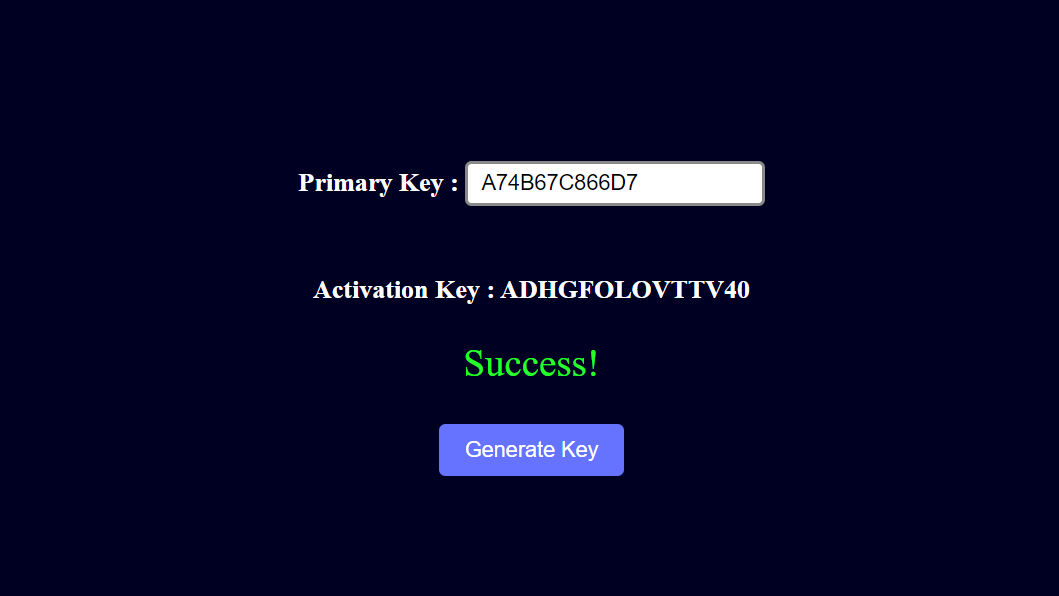
Here's the final output of the test script.
How to defend against this
Everything needed to forge an activation code ships inside the app: the character table, the decode function, and the check that compares the result. Anyone with a decompiler can read them, and because the cipher is reversible, the decoder also gives away the encoder. If you are adding licensing to an app, three rules close that gap:
- Move the licence check to a server. Have the app send its primary key to a server you control, and let the server decide whether the activation code is valid. Logic that never ships cannot be decompiled.
- Sign licences instead of encoding them. Have the server sign each licence with a private key that never leaves it, and let the app verify the signature with the matching public key. Reading the verification code does not show anyone how to create a valid licence.
- Never trust the device. Anything that runs on the user's device can be read, patched, or skipped, so treat on-device checks as a convenience and enforce what the licence unlocks on the server.
Next Article
Previous Article